Type-safe React 19 Forms with React Hook Form, Zod, Apollo and GraphQL Codegen
Most form bugs I’ve shipped haven’t been in the form itself. They’ve been in the gaps between layers: the frontend allows a 100 character name but the API rejects anything over 80, someone adds a required field to the GraphQL input and the form keeps sending the old shape, or the client checks that the end date is after the start date but the server never does.
The usual cause is that the same rules live in three places:
- The TypeScript types for the form and the API
- The client-side validation
- The server-side validation
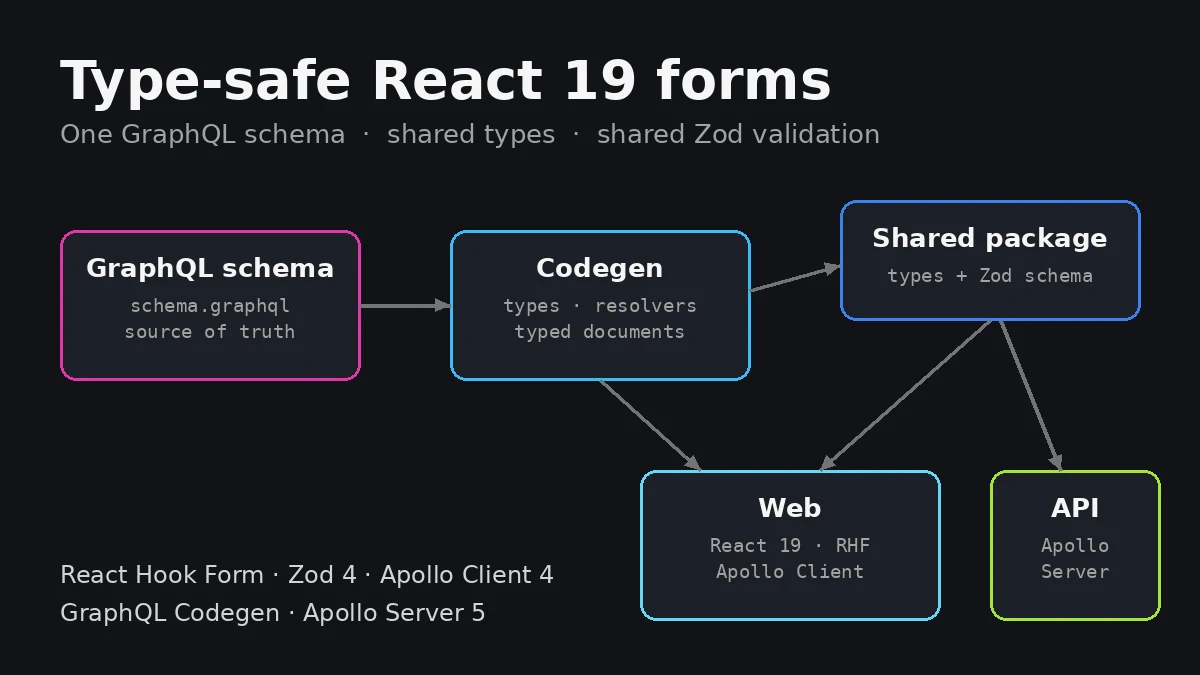
This post shows a setup where each of those is defined once:
- The GraphQL schema is the source of truth for the shape of the data. GraphQL Codegen turns it into TypeScript types for both the frontend and the backend.
- A single Zod schema in a shared package holds the rules. React Hook Form runs it in the browser and the resolver runs the same schema on the server.
- The type checker ties them together. If the GraphQL schema and the Zod schema drift apart, the build fails.
All the code in this post comes from a small working project. It type-checks against the library versions below, and it’s covered by an end-to-end test that runs the real form against a real Apollo Server.
The stack
| Package | Version |
|---|---|
react / react-dom | 19.3 |
react-hook-form | 7.89 |
@hookform/resolvers | 5.9 |
zod | 4.6 |
@apollo/client | 4.3 |
@apollo/server | 5.5 |
graphql | 16.x (Apollo doesn’t support 17 yet) |
@graphql-codegen/cli | 7.4 |
@graphql-codegen/client-preset | 6.2 |
What we’re building
A “create project” form with fields that cover the cases that usually cause problems:
| Field | GraphQL type | Rules |
|---|---|---|
name | String! | 3–80 characters, trimmed |
slug | String! | lowercase, numbers and single hyphens, unique (API) |
description | String | optional, max 500 characters |
visibility | ProjectVisibility! | enum |
startDate | Date! | valid ISO date |
endDate | Date | optional, valid ISO date, on or after startDate |
budget | Float! | number greater than 0 |
That gives us optional fields, an enum, dates, a number input, a cross-field rule and a rule that only the server can check.
Project layout
.
├── codegen.ts
├── packages/
│   ├── graphql/
│   │   └── schema.graphql          # source of truth
│   └── shared/                     # @acme/shared
│       └── src/
│           ├── generated/graphql.ts  # generated types
│           ├── validation/
│           │   ├── helpers.ts
│           │   ├── project.ts        # shared Zod schema
│           │   └── errors.ts
│           └── index.ts
└── apps/
    ├── api/                        # Apollo Server
    │   └── src/
    │       ├── generated/resolvers.ts  # generated resolver types
    │       ├── context.ts
    │       ├── db.ts
    │       ├── resolvers.ts
    │       └── server.ts
    └── web/                        # React 19 + Apollo Client
        └── src/
            ├── gql/                    # generated typed documents
            ├── apollo.ts
            ├── TextField.tsx
            ├── applyFieldErrors.ts
            └── CreateProjectForm.tsx
I’m using a pnpm workspace, so apps/web and apps/api depend on @acme/shared with "@acme/shared": "workspace:*". The same idea works in any monorepo tool, or even with TypeScript path aliases in a single repo.
Step 1: the GraphQL schema is the source of truth
scalar Date

enum ProjectVisibility {
  PRIVATE
  TEAM
  PUBLIC
}

type Project {
  id: ID!
  name: String!
  slug: String!
  description: String
  visibility: ProjectVisibility!
  startDate: Date!
  endDate: Date
  budget: Float!
}

input CreateProjectInput {
  name: String!
  slug: String!
  description: String
  visibility: ProjectVisibility!
  startDate: Date!
  endDate: Date
  budget: Float!
}

"""
A validation problem with one field of the input.
`field` is a dot-separated path, e.g. "endDate" or "tags.0".
"""
type FieldError {
  field: String!
  message: String!
}

type CreateProjectPayload {
  project: Project
  errors: [FieldError!]!
}

type Query {
  projects: [Project!]!
}

type Mutation {
  createProject(input: CreateProjectInput!): CreateProjectPayload!
}
The important design choice here is the payload type. createProject doesn’t throw on validation errors. It returns a CreateProjectPayload with a list of FieldErrors.
This “errors as data” pattern suits forms much better than throwing a GraphQLError:
- Validation errors are part of the schema, so Codegen generates types for them and the client reads them with full type safety. You don’t need to dig through untyped
extensionsobjects. - Each error has a
fieldpath, which maps straight onto React Hook Form’s field names. - Genuine failures, such as the database being down or a bug in a resolver, still come back as GraphQL errors. That keeps a clear line between “the user needs to fix something” and “something broke”.
Step 2: one Codegen config, three outputs
Install the tooling:
pnpm add -D @graphql-codegen/cli @graphql-codegen/typescript \
  @graphql-codegen/typescript-resolvers @graphql-codegen/client-preset @graphql-codegen/add
Then one codegen.ts at the root generates everything from the one schema:
import type { CodegenConfig } from '@graphql-codegen/cli'

const config: CodegenConfig = {
  schema: 'packages/graphql/schema.graphql',
  config: {
    strictScalars: true,
    scalars: {
      ID: { input: 'string', output: 'string' },
      Date: { input: 'string', output: 'string' },
    },
    enumsAsConst: true,
    useTypeImports: true,
  },
  generates: {
    // 1. Shared: base TypeScript types for every GraphQL type, input and enum
    'packages/shared/src/generated/graphql.ts': {
      plugins: ['typescript'],
    },
    // 2. API: typed resolvers that import the shared types
    'apps/api/src/generated/resolvers.ts': {
      plugins: [
        { add: { content: "import type * as Types from '@acme/shared'" } },
        'typescript-resolvers',
      ],
      config: {
        namespacedImportName: 'Types',
        contextType: '../context#Context',
      },
    },
    // 3. Web: typed documents for Apollo Client
    'apps/web/src/gql/': {
      documents: ['apps/web/src/**/*.tsx'],
      preset: 'client',
      presetConfig: { fragmentMasking: false },
    },
  },
}

export default config
The three outputs:
packages/shared/src/generated/graphql.tsholds the base types for every GraphQL type, input and enum, such asCreateProjectInput,FieldErrorandProjectVisibility. Both apps import these from@acme/shared.apps/api/src/generated/resolvers.tsholds the resolver signatures. Theaddplugin plusnamespacedImportNamemake it import the shared types instead of generating a second copy. That way the API’s argument types are exactly the ones the Zod schema is checked against.apps/web/src/gql/comes from the client preset. It generates agraphql()function that returns aTypedDocumentNode, so Apollo knows the variables and result type of every operation without any manual generics.
A few config options are worth calling out:
strictScalarsplus explicitscalarsmakes Codegen error if you add a custom scalar without saying what TypeScript type it maps to, instead of silently usingany.enumsAsConstgenerates a plain object and a union type instead of a TypeScriptenum. It works with Zod’sz.enum(), gives you runtime values for a<select>, and has no enum-specific runtime quirks.useTypeImportsemitsimport type, which keepsverbatimModuleSyntaxand bundlers happy.
Add a script and run it whenever the schema or an operation changes (--watch is handy during development):
{
  "scripts": {
    "codegen": "graphql-codegen --config codegen.ts"
  }
}
Step 3: the shared Zod schema
This is the heart of the setup. It lives in @acme/shared, so the browser and the API import exactly the same code.
First, a small helper. HTML inputs use '' for “no value”, while GraphQL uses null or leaves the field out. The helper accepts all three and normalises them to null, so the parsed value matches the nullable GraphQL field:
import { z } from 'zod'

/**
 * HTML inputs give us '' for "no value", GraphQL gives us null or undefined.
 * Accept all three and normalise them to null so the output matches the
 * nullable GraphQL input field.
 */
export const optional = <T extends z.ZodType<string, string>>(schema: T) =>
  z
    .union([schema, z.literal('')])
    .nullish()
    .transform((value) => value || null)
Now the schema:
import { z } from 'zod'
import { ProjectVisibility, type CreateProjectInput } from '../generated/graphql'
import { optional } from './helpers'

export const createProjectSchema = z
  .object({
    name: z
      .string()
      .trim()
      .min(3, 'Name must be at least 3 characters')
      .max(80, 'Name must be 80 characters or fewer'),
    slug: z
      .string()
      .trim()
      .regex(/^[a-z0-9]+(?:-[a-z0-9]+)*$/, 'Use lowercase letters, numbers and single hyphens'),
    description: optional(z.string().trim().max(500, 'Keep the description under 500 characters')),
    visibility: z.enum(ProjectVisibility),
    startDate: z.iso.date('Enter a valid start date'),
    endDate: optional(z.iso.date('Enter a valid end date')),
    budget: z.number({ error: 'Enter a budget' }).positive('Budget must be greater than 0'),
  })
  .refine((input) => !input.endDate || input.endDate >= input.startDate, {
    message: 'End date must be on or after the start date',
    path: ['endDate'],
  }) satisfies z.ZodType<CreateProjectInput>

/** What the form holds while the user is typing */
export type CreateProjectFormValues = z.input<typeof createProjectSchema>
/** What comes out after validation; safe to send as the mutation input */
export type CreateProjectValues = z.output<typeof createProjectSchema>

// Compile-time guard: the schema and the GraphQL input must have exactly the same fields
type SameKeys<A, B> = [keyof A] extends [keyof B] ? ([keyof B] extends [keyof A] ? true : false) : false
const _sameKeys: SameKeys<CreateProjectValues, CreateProjectInput> = true
void _sameKeys
Some details worth understanding:
Input and output types. A Zod schema has two types. z.input is what goes in: an empty string is fine for endDate, for example. z.output is what comes out after trimming and transforms, where endDate is string | null. The form holds the input type while the user types, and the submit handler and the API receive the output type. We’ll pass both to React Hook Form shortly.
Zod 4 APIs. z.iso.date() validates a YYYY-MM-DD string (it rejects 2026-02-30, too). z.enum() accepts the generated ProjectVisibility object directly. The { error: '...' } option replaces the default message for wrong-type errors, which matters for budget: an empty number input gives NaN, and “Enter a budget” is friendlier than “Invalid input: expected number, received NaN”.
Cross-field rules. .refine() with a path attaches the error to endDate, so React Hook Form shows it next to that input rather than as a form-level error.
Keeping Zod and GraphQL in sync
Two compile-time checks stop the schemas drifting apart:
satisfies z.ZodType<CreateProjectInput>checks that whatever the schema outputs can be sent as the GraphQL input. It catches a wrong type, or a required GraphQL field the schema doesn’t produce.SameKeyscatches the opposite direction: a field the Zod schema validates that the GraphQL input doesn’t have.satisfiesalone allows extra keys.
I tested them by breaking the GraphQL schema and re-running Codegen and tsc. Each change fails the build at the shared schema:
Change to CreateProjectInput | Error |
|---|---|
Add a required ownerId: ID! | Property 'ownerId' is missing… and the satisfies check fails |
Change budget from Float! to String! | …does not satisfy the expected type 'ZodType<CreateProjectInput…>' |
Remove description | Type 'true' is not assignable to type 'false' (the SameKeys check) |
That’s the safety net: you can’t change the API contract without the build telling you which validation needs updating.
Turning Zod errors into FieldErrors
One more shared helper converts a ZodError into the FieldError list the mutation returns. Zod issue paths are arrays like ['endDate'], and joining them with dots gives the same names React Hook Form uses:
import type { z } from 'zod'
import type { FieldError } from '../generated/graphql'

/** Turn a ZodError into the FieldError list our mutations return */
export const toFieldErrors = (error: z.ZodError): FieldError[] =>
  error.issues.map((issue) => ({
    field: issue.path.join('.'),
    message: issue.message,
  }))
And the package entry point:
export * from './generated/graphql'
export * from './validation/project'
export * from './validation/errors'
Step 4: the API
Always validate on the server, even with client-side validation in place. The browser is not a trusted environment, and other clients (scripts, mobile apps, someone with curl) will call your API directly.
A stand-in data layer:
import { randomUUID } from 'node:crypto'
import type { CreateProjectValues, Project } from '@acme/shared'

// Stand-in for your real data layer
const projects: Project[] = []

export const db = {
  async slugExists(slug: string) {
    return projects.some((project) => project.slug === slug)
  },
  async createProject(input: CreateProjectValues): Promise<Project> {
    const project = { id: randomUUID(), ...input }
    projects.push(project)
    return project
  },
  async listProjects() {
    return projects
  },
}

export type Db = typeof db
import type { Db } from './db'
export type Context = { db: Db }The resolvers. The generated Resolvers type means input is already typed as CreateProjectInput, and the return value is checked against CreateProjectPayload:
import { createProjectSchema, toFieldErrors } from '@acme/shared'
import type { Resolvers } from './generated/resolvers'
import type { Db } from './db'

// Server-only rules build on the shared schema rather than replacing it
const createProjectServerSchema = (db: Db) =>
  createProjectSchema.refine(async ({ slug }) => !(await db.slugExists(slug)), {
    message: 'That slug is already taken',
    path: ['slug'],
  })

export const resolvers: Resolvers = {
  Query: {
    projects: (_parent, _args, { db }) => db.listProjects(),
  },
  Mutation: {
    createProject: async (_parent, { input }, { db }) => {
      const result = await createProjectServerSchema(db).safeParseAsync(input)

      if (!result.success) {
        return { project: null, errors: toFieldErrors(result.error) }
      }

      const project = await db.createProject(result.data)
      return { project, errors: [] }
    },
  },
}
The slug uniqueness check needs the database, so it can’t run in the browser. Instead of a separate code path, createProjectServerSchema extends the shared schema with an async .refine(), and the resolver uses safeParseAsync. Every shared rule still runs, the server-only rule is added on top, and all errors come back in the same FieldError format.
Zod only runs an object-level .refine() once all the field-level checks pass, so the database isn’t queried for a slug that’s already invalid.
The server itself is standard Apollo Server 5:
import { readFileSync } from 'node:fs'
import { ApolloServer } from '@apollo/server'
import { startStandaloneServer } from '@apollo/server/standalone'
import { resolvers } from './resolvers'
import { db } from './db'
import type { Context } from './context'

const typeDefs = readFileSync(new URL('../../../packages/graphql/schema.graphql', import.meta.url), 'utf8')

const server = new ApolloServer<Context>({ typeDefs, resolvers })

const { url } = await startStandaloneServer(server, {
  listen: { port: Number(process.env.PORT ?? 4000) },
  context: async () => ({ db }),
})

console.log(`API ready at ${url}`)
Calling the API directly with bad data, bypassing the frontend entirely, gives:
{
  "project": null,
  "errors": [
    { "field": "name", "message": "Name must be at least 3 characters" },
    { "field": "slug", "message": "Use lowercase letters, numbers and single hyphens" },
    { "field": "startDate", "message": "Enter a valid start date" },
    { "field": "budget", "message": "Budget must be greater than 0" }
  ]
}
Those are the same messages the form shows, because they come from the same schema.
Step 5: the React 19 frontend
Apollo Client
In Apollo Client 4, the core classes come from @apollo/client and the React hooks from @apollo/client/react:
import { ApolloClient, HttpLink, InMemoryCache } from '@apollo/client'

export const createApolloClient = (uri = '/graphql') =>
  new ApolloClient({
    link: new HttpLink({ uri }),
    cache: new InMemoryCache(),
  })
Wrap your app in <ApolloProvider client={createApolloClient()}> (also imported from @apollo/client/react).
An accessible input, with no forwardRef
React Hook Form’s register() returns a ref along with name, onChange and onBlur. Before React 19, a custom input component had to use forwardRef to receive that ref. In React 19, ref is just a prop, so the component can destructure it like anything else:
import { useId, type ComponentProps } from 'react'

type TextFieldProps = ComponentProps<'input'> & {
  label: string
  error?: string
}

// React 19: `ref` is a regular prop, so no forwardRef is needed for register()
export function TextField({ label, error, ref, ...inputProps }: TextFieldProps) {
  const id = useId()
  const errorId = `${id}-error`

  return (
    <div className="field">
      <label htmlFor={id}>{label}</label>
      <input
        id={id}
        ref={ref}
        aria-invalid={error ? true : undefined}
        aria-describedby={error ? errorId : undefined}
        {...inputProps}
      />
      {error && (
        <p id={errorId} role="alert" className="field-error">
          {error}
        </p>
      )}
    </div>
  )
}
useId generates stable IDs to link the label, input and error message. aria-invalid and aria-describedby mean screen readers announce the error when the input is focused, and role="alert" announces new errors as they appear.
Mapping server errors onto fields
This helper takes the FieldErrors from the mutation payload and calls setError for each one. Errors for fields that aren’t in the form become a form-level root error, so nothing is silently dropped:
import type { FieldError } from '@acme/shared'
import type { FieldValues, Path, UseFormSetError } from 'react-hook-form'

/**
 * Show server-side FieldErrors on the matching inputs. Anything that doesn't
 * map to a field in this form becomes a form-level (root) error instead.
 */
export function applyFieldErrors<T extends FieldValues>(
  errors: readonly FieldError[],
  setError: UseFormSetError<T>,
  fieldNames: readonly string[],
) {
  for (const { field, message } of errors) {
    if (fieldNames.includes(field.split('.')[0])) {
      setError(field as Path<T>, { type: 'server', message }, { shouldFocus: true })
    } else {
      setError('root.server', { type: 'server', message })
    }
  }
}
The form
import { useMutation } from '@apollo/client/react'
import { zodResolver } from '@hookform/resolvers/zod'
import { useForm, useWatch, type DefaultValues } from 'react-hook-form'
import {
  createProjectSchema,
  ProjectVisibility,
  type CreateProjectFormValues,
  type CreateProjectValues,
} from '@acme/shared'
import { graphql } from './gql'
import { TextField } from './TextField'
import { applyFieldErrors } from './applyFieldErrors'

const CreateProjectMutation = graphql(`
  mutation CreateProject($input: CreateProjectInput!) {
    createProject(input: $input) {
      project {
        id
        name
        slug
      }
      errors {
        field
        message
      }
    }
  }
`)

// DefaultValues is deeply partial, so budget can start out empty
const defaultValues: DefaultValues<CreateProjectFormValues> = {
  name: '',
  slug: '',
  description: '',
  visibility: ProjectVisibility.Private,
  startDate: '',
  endDate: '',
}

type Props = {
  onCreated?: (project: { id: string; name: string; slug: string }) => void
}

export function CreateProjectForm({ onCreated }: Props) {
  const [createProject] = useMutation(CreateProjectMutation)

  const {
    register,
    handleSubmit,
    control,
    setError,
    reset,
    formState: { errors, isSubmitting },
  } = useForm<CreateProjectFormValues, unknown, CreateProjectValues>({
    resolver: zodResolver(createProjectSchema),
    defaultValues,
    mode: 'onTouched',
  })

  // Subscribe to one field without re-rendering the whole form on every keystroke
  const description = useWatch({ control, name: 'description' }) ?? ''

  const onSubmit = async (input: CreateProjectValues) => {
    try {
      const { data } = await createProject({ variables: { input } })
      const payload = data?.createProject

      if (!payload) return

      if (payload.errors.length > 0) {
        applyFieldErrors(payload.errors, setError, Object.keys(createProjectSchema.shape))
        return
      }

      if (payload.project) {
        reset()
        onCreated?.(payload.project)
      }
    } catch {
      setError('root.server', {
        type: 'server',
        message: 'Something went wrong. Please try again.',
      })
    }
  }

  return (
    <form onSubmit={handleSubmit(onSubmit)} noValidate>
      <TextField label="Name" error={errors.name?.message} {...register('name')} />
      <TextField label="Slug" error={errors.slug?.message} {...register('slug')} />

      <div className="field">
        <label htmlFor="description">Description</label>
        <textarea
          id="description"
          aria-invalid={errors.description ? true : undefined}
          {...register('description')}
        />
        <small>{description.length}/500</small>
        {errors.description && <p role="alert">{errors.description.message}</p>}
      </div>

      <div className="field">
        <label htmlFor="visibility">Visibility</label>
        <select id="visibility" {...register('visibility')}>
          {Object.entries(ProjectVisibility).map(([label, value]) => (
            <option key={value} value={value}>
              {label}
            </option>
          ))}
        </select>
      </div>

      <TextField
        type="date"
        label="Start date"
        error={errors.startDate?.message}
        {...register('startDate')}
      />
      <TextField
        type="date"
        label="End date"
        error={errors.endDate?.message}
        {...register('endDate')}
      />
      <TextField
        type="number"
        step="0.01"
        label="Budget"
        error={errors.budget?.message}
        {...register('budget', { valueAsNumber: true })}
      />

      {errors.root?.server && <p role="alert">{errors.root.server.message}</p>}

      <button type="submit" disabled={isSubmitting}>
        {isSubmitting ? 'Creating…' : 'Create project'}
      </button>
    </form>
  )
}
Let’s go through the decisions in this component.
Three type parameters on useForm
useForm<CreateProjectFormValues, unknown, CreateProjectValues>The first parameter is the form’s input type (what the fields hold), the second is the context type and the third is the output type the resolver produces. With @hookform/resolvers v5 and Zod 4, handleSubmit then passes onSubmit the parsed output: trimmed strings, null instead of '' for the optional fields, and a real number for budget. That output type is the one the satisfies check proved compatible with CreateProjectInput, so it goes straight into the mutation’s variables with no mapping code.
handleSubmit, not a React 19 form action
React 19 added form actions (<form action={fn}>), useActionState and useFormStatus. They’re excellent for forms where the server does the work, especially with Server Functions. But when React Hook Form owns the form state, stick with onSubmit={handleSubmit(onSubmit)}:
handleSubmitruns the Zod resolver first and only callsonSubmitwith valid, parsed data. A form action receives rawFormDataand skips that step.- React 19 automatically resets a form after its action completes. That resets the DOM inputs behind React Hook Form’s back, so its state and the inputs no longer match.
useFormStatusonly reports pending state for form actions. It won’t see a submission made throughonSubmit. Use React Hook Form’sformState.isSubmittinginstead, which staystrueuntil the asynconSubmitsettles, including the network request.
If you’d like a deeper look at the React 19 APIs themselves, I’ve covered useActionState, useFormStatus and useOptimistic separately.
Validation timing
mode: 'onTouched' validates a field when the user first leaves it, then re-validates on every change. That avoids shouting at someone halfway through typing, while still clearing an error as soon as it’s fixed. The whole form is always validated on submit as well.
Number inputs
register('budget', { valueAsNumber: true }) makes React Hook Form store a number instead of the input’s string value. An empty input becomes NaN, which the schema rejects with “Enter a budget”. Because DefaultValues is deeply partial, budget can be left out of defaultValues instead of being seeded with a fake number.
useWatch for derived UI
The character counter uses useWatch({ control, name: 'description' }). It subscribes to that one field, so only this component re-renders as the user types. Prefer it over calling watch() during render. It isolates re-renders, and the hook-based subscriptions (useWatch, useFormState) are the ones to reach for if you’re using the React Compiler.
Three kinds of error
The submit handler deals with three different outcomes:
- Client-side validation errors never reach
onSubmit. The resolver catches them, and nothing is sent to the API. - Server-side validation errors come back as data in
payload.errors.applyFieldErrorsputs each one on its field withsetError, andshouldFocusmoves focus to the first. This is where the “slug already taken” error appears. - Unexpected failures such as network errors, resolver crashes or GraphQL errors make the mutate promise reject, because Apollo Client’s default
errorPolicyis'none'. Thecatchturns that into a form-levelroot.servererror, so the form never fails silently.
On success, reset() restores the default values and clears the errors.
Alternative: generate the Zod schema from the GraphQL schema
There’s another approach to shared validation: put the rules in the GraphQL schema with directives and let graphql-codegen-typescript-validation-schema generate the Zod schema.
directive @constraint(minLength: Int, maxLength: Int, pattern: String, min: Float) on INPUT_FIELD_DEFINITION

input CreateProjectInput {
  name: String! @constraint(minLength: 3, maxLength: 80)
  slug: String! @constraint(pattern: "^[a-z0-9]+(?:-[a-z0-9]+)*$")
  description: String @constraint(maxLength: 500)
  visibility: ProjectVisibility!
  startDate: Date!
  endDate: Date
  budget: Float! @constraint(min: 0.01)
}
{
'typescript-validation-schema': {
schema: 'zodv4',
scalarSchemas: { Date: 'z.iso.date()' },
directives: {
constraint: {
minLength: 'min',
maxLength: 'max',
pattern: ['regex', '/$1/'],
min: 'min',
},
},
},
}Which generates:
export function CreateProjectInputSchema(): z.ZodObject<Properties<CreateProjectInput>> {
  return z.object({
    budget: z.number().min(0.01),
    description: z.string().max(500).nullish(),
    endDate: z.iso.date().nullish(),
    name: z.string().min(3).max(80),
    slug: z.string().regex(/^[a-z0-9]+(?:-[a-z0-9]+)*$/),
    startDate: z.iso.date(),
    visibility: ProjectVisibilitySchema,
  })
}
It’s neat because the rules sit right next to the types, and the API’s schema documents them. When I tried it for a form, I hit some trade-offs:
- Messages. The generated schema uses Zod’s default messages, such as
Too small: expected number to be >=0.01. That’s fine for an API but not what you want under a form field, so you end up overriding most of them anyway. - Form-specific behaviour. Trimming, turning
''intonulland cross-field rules like the date check can’t be expressed with directives. - Type precision. The generated function is annotated as
z.ZodObject<Properties<CreateProjectInput>>. Once you.extend()it to add messages, the result no longer satisfiesCreateProjectInput, so you lose the drift check.
My recommendation: hand-write the shared Zod schema for anything user-facing, and keep the compile-time checks above so it can’t drift. Directive-generated schemas are a good fit for simple, API-only inputs where default messages are fine.
Testing it end to end
The test for this project starts a real Apollo Server on a random port, renders CreateProjectForm with a real Apollo Client pointed at it, and drives it with Testing Library’s user-event. It checks four things:
- Submitting the empty form shows
Name must be at least 3 characters,Use lowercase letters, numbers and single hyphens,Enter a valid start dateandEnter a budget, and no request is sent. - An end date before the start date shows
End date must be on or after the start dateon the end date field. - A valid submission creates the project and calls
onCreated. The stored record hasdescription: nullandendDate: null, not empty strings. Submitting the same slug again showsThat slug is already takenon the slug field, which comes from the server-only rule. - Posting invalid data straight to the API, with no form involved, returns the
FieldErrors shown earlier.
A test like this catches mistakes in the wiring between the layers, which unit tests of each piece on its own would miss.
Wrapping up
To recap the rules this setup follows:
- One schema for shape. The GraphQL schema generates the TypeScript types for the frontend and the backend.
- One schema for rules. A Zod schema in a shared package, run by React Hook Form in the browser and by the resolver on the server.
- Make drift a compile error. Use
satisfies z.ZodType<GeneratedInput>plus a key-equality check. - Server-only rules extend the shared schema with async
.refine()instead of living in a separate code path. - Return validation errors as data, with field paths that match your form’s field names.
- In React 19 with React Hook Form, use
handleSubmitrather than form actions, passrefas a plain prop, useformState.isSubmittingfor pending state, anduseWatchfor derived UI.
The result is a form where changing a rule means editing one file, and changing the API contract makes the build tell you exactly what else needs to change.